Mobile app developers: Every role your app needs.
One team writes the scope, draws the screens, builds your Android and iOS app and the server behind it, then releases it and keeps it running. The code stays in your name.
Built by us: Trustiva Laboratory’s two apps, RaasPaas and our Workforce app.
4
mobile apps our developers built and run, each with its own server and admin panel.
5.0 on Google · 21 reviews01 · Why it matters
An app needs more than one developer.
- A freelancer for the screens
- Someone else for the server
- You, in the middle
- One team of app developers
Most people looking for mobile app developers picture one person who can build the app. A business app also needs a written scope, screens, a server and database, an admin panel for your staff, a release and someone to fix it later. Hire one developer and the rest falls back to you. Our app developers work as one team from our office in Ahmedabad, so every part has an owner.
01
“Our developer left, and the code went too.”
You own the code, the database and every login, so the work never leaves with one person.
02
“One person can’t do the app and the server.”
The screens, the Android and iOS app, the server and the admin panel are planned and built together, by one team.
03
“I never know where the work is.”
Each stage ends with a build you open on your own phone, so you judge the progress yourself.
04
“Nobody answers after launch.”
The people who wrote the app host its server, keep the backups and make the fixes.
02 · The team
What our mobile app developers do
Six jobs every business app needs, and who on our team does them. One person can hold more than one; you deal with one plan, not six people.
Before any code
Agree what to build.
So the app does what your business needs.
Scope and plan
Writes down who uses the app, what each person does in it, and what comes first.
Screen design
Draws each screen and the steps between them, so you see the app before it is built.
Data and server design
Decides what the server keeps for each screen, and which staff may see or change it.
Build, release, run
Build it and keep it running.
In one TypeScript stack, start to finish.
App development
Builds the Android and iOS app from one React Native codebase, with Expo.
Server and admin panel
Builds the NestJS API, the PostgreSQL database and the Next.js admin panel your staff use.
Release and care
Puts each build on your phone, releases the app, runs the server on ZD Host with nightly backups, and fixes what breaks.
03 · The stack
The stack our app developers use
Only the tools our live projects run on. Each line names something we built with it.
On the phone
One codebase for both phones.
React Native with Expo, in TypeScript.
Two apps on one system
Trustiva Laboratory: an app for patients and one for the staff who collect samples at home, each built once for Android and iOS.
Three languages in one app
RaasPaas, our Navratri pass platform: English, Gujarati and Hindi, beside its website and installable web app.
Phone-first web screens
Enisop, our driver induction: drivers scan a QR code and take the safety quiz on their phone, with nothing to install.
Behind the app
The server it talks to.
NestJS, PostgreSQL and Next.js.
API and database
NestJS on PostgreSQL, with Prisma or Kysely; Trustiva’s system adds Redis and MinIO for files.
Admin panel
Next.js and React; Trustiva’s lab staff work in an admin panel built with Refine and Ant Design.
Hosting and releases
Docker on ZD Host, our own platform: deploys from GitHub with a health check and rollback, and nightly backups.
04 · How it works
How you work with our mobile app developers
Step 01
Brief
Tell us what you need, what you sell and where.
Step 02
Plan
We reply within two working days with one plan for your marketing and tech, priced in ₹.
Step 03
Scope and screens
We write the scope and draw the screens with you. Nothing is built until you agree them.
Step 04
Stage by stage
Each stage ends with a build on your own phone. You try it, we change what you ask, then the next stage starts. After launch, the same team looks after it.
05 · Selected work
Apps our developers built, and how
Live projects on our Work page. The pictures show a phone screen and an admin screen the same developers built, with made-up data.
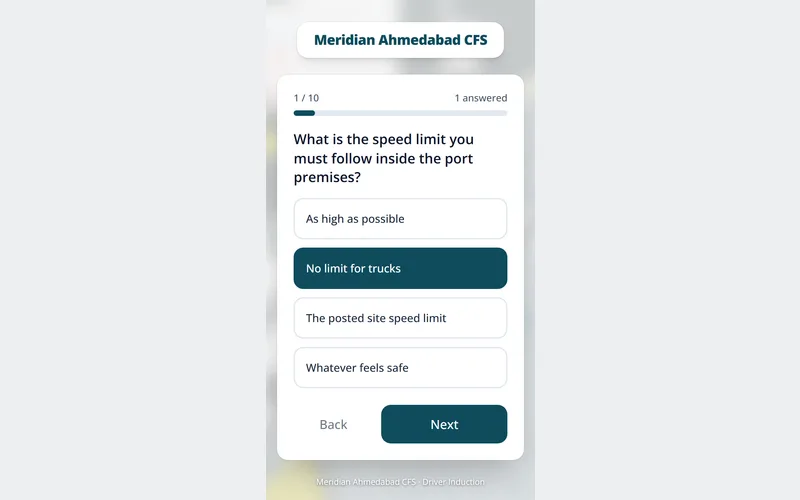
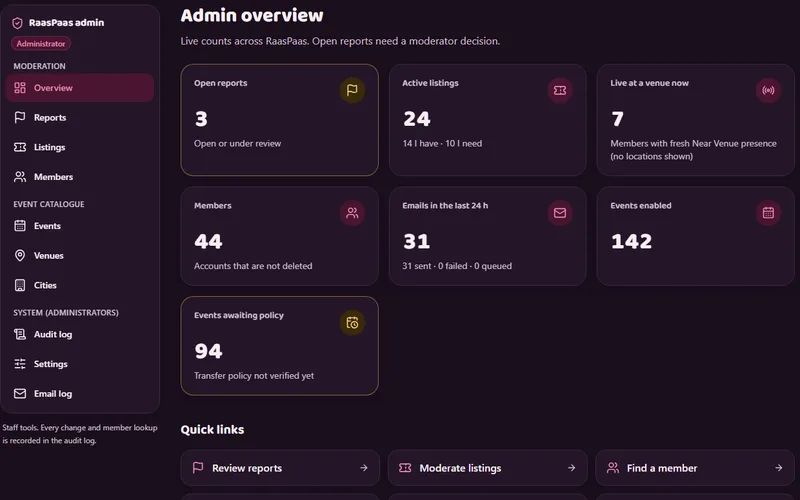
Build facts
Planned before it was built
Trustiva’s lab platform: a 32-entity data model, 145 written requirements and 51 screens behind its two apps.
Scoped to what it needs
RaasPaas left out payments, OTP and tickets on purpose, and ships one app in three languages.
Our own team’s app
Our Workforce Platform, for attendance, tasks and payroll, has a mobile app beside its web app, on a NestJS and PostgreSQL server.
Releases with a way back
Trustiva and RaasPaas run on ZD Host: each deploy from GitHub passes a health check or rolls back, and backups run nightly.
06 · Comparison
Why choose Zero Dimensions’ app developers
Most businesses weigh three ways to get an app built: a team like ours, an independent mobile app developer, or a developer on their own payroll. Here is how they differ.
| What matters | Zero Dimensions | A freelancer | An in-house developer |
|---|---|---|---|
| Who covers each part | Scope, screens, app, server and hosting | One person’s skills; the rest is yours to find | One person’s skills, until you hire more |
| How you pay | One plan, priced in ₹ | By the hour or by the part | Salary, laptop and leave, every month |
| Who runs the work | We do, against the agreed plan | You do | You do |
| Who owns the code | You do: code, data and logins | Agree it in writing | You do |
| After launch | We host it and fix it | Depends on their time | Your developer, plus hosting you arrange |
A freelancer can suit one small, clear job. An in-house developer suits a business whose app is its main product and that will build a team around it. For a business app with a server and an admin panel, a team is simpler to run.
07 · In your name
Your code, your store accounts.
What stays yours when our developers build your app.
- The code of the app, the server and the admin panel.
- The database and everything in it.
- Every login: the domain, the hosting account, the server and the admin panel.
- Google Play and App Store developer accounts in your business’s name, so the app is listed under you.
- The written scope and the screens, so another team could take the work over.
- Hosting, backups and fixes by our team, only if you want them.
08 · Cost
What do mobile app developers cost?
We price the app, not the hours, and we don’t publish rates. Five things set the price.
Which parts you need: the scope and screens, the app, the server, the admin panel, or all of them.
How many screens, and who uses them: customers, staff or both.
What the app connects to: payments, SMS, maps or your current software.
How many languages the app speaks.
Hosting, updates and fixes after launch.
Tell us what you need and we send one plan, priced in ₹.
Get visible09 · Questions
Mobile app developers FAQs
They turn what your business needs into a working app: the scope, the screens, the Android and iOS app, the server and admin panel it works with, the release and the fixes after it. As custom mobile app developers, we do all of these as one team, so you deal with one plan.
People in the six roles under “The team” above: scope and plan, screen design, data and server design, app development, the server and admin panel, then release and care. One person can hold more than one role. You can meet them at our Ahmedabad office.
An app developer company: Zero Dimensions Private Limited, a mobile app developer company in India with its office in Ahmedabad. If you need an app developer for one small, clear job, a freelancer can suit. For an app with a server and an admin panel, a team is simpler.
Both, from one codebase: our developers build the Android and the iOS app together in React Native. If your app needs a native mobile app developer for Swift or Kotlin work, such as a game or an app built around one phone’s own features, we will say so in the plan.
Native Android apps are written in Kotlin or Java, and native iOS apps in Swift. Cross-platform apps use one language for both: React Native uses JavaScript or TypeScript, and Flutter uses Dart. We write the app, the server and the admin panel in TypeScript.
The plan we send prices the work on your app in ₹, rather than developers by the hour or the month. You don’t manage our developers day to day; the plan and the stages do that. After launch, the same team can stay on for hosting, updates and fixes.
Each stage ends with a build you open on your own Android phone or iPhone, checked against the screens you agreed. You try it, tell us what to change, and the next stage starts from there.
You do. For apps we build for you, you own the code of the app and the server, the database and every login, whether or not we host it. The Google Play and App Store developer accounts belong in your business’s name too, so the app is listed under you.
It depends on the parts you need, the screens, who uses the app, what it connects to, the languages and the care after launch. We don’t publish rates. Tell us what you need and we send one plan, priced in ₹.
Yes. If you searched “app developer near me” from in or around Ahmedabad, we are on the 4th floor of i-Hub, inside KCG Campus, Navrangpura, Monday to Saturday, 9:30 am to 6 pm. As local app developers we are easy to meet, and we work with businesses across India.
Yes. As app developers for startups, we can begin with the first version: the few screens that prove the idea, then more in stages. RaasPaas, our own product, launched without payments, OTP or tickets, because it didn’t need them.
Ask to see apps that are still running, who built the server behind them, who hosts and fixes them, and who owns the code. Rated lists and rankings are often paid, so judge the work. If you are looking for an app developer, judge us the same way: our apps are on our Work page.
Ready to be seen?
Tell us what you need, what you sell and where. We reply within two working days with one plan for your marketing and tech, priced in ₹.
Prefer to talk? Call +91 63544 29800 or WhatsApp us.