Enterprise app development company: Many sites. One system.
Admin systems and apps for organisations with many users, sites and roles: an admin for each site, a log of changes and nightly backups. One team builds, hosts and looks after them.
Running for Ringing Bells, WowEye and Trustiva, and as our own Enisop and ZD Host.
01 · Why it matters
More sites, more people, less control.
- One shared admin login
- A separate copy for each site
- Reports stitched from sheets
- One system, a role for each
As a business adds sites, branches and staff, the tools that worked for one office stop working: one login is shared, each site keeps its own copy, and nobody can say who changed what. An enterprise app development company builds one system with a role for each person and a record of each change. We build them in Ahmedabad and run them on our own hosting.
01
“Everyone uses the same admin login.”
Each person gets their own login and role, so a site manager sees their site and access ends when someone leaves.
02
“We can’t tell who changed it.”
An audit log records who changed what, and when, on the records that matter to you.
03
“If the server fails, we lose everything.”
Nightly backups with restore points, on hosting run by the people who built the system.
04
“Is a smaller team safe for this?”
See live systems with roles, logs and backups before you decide. The code and the data are yours either way.
02 · What we build
What our enterprise app development company builds
Enterprise app development solutions in two groups: the system your people use, and the controls behind it.
The system
What people use.
One place for every site and team.
Admin panels for many sites
Settings, records and reports for each site, and one view across all of them.
Web and phone apps
Web apps and Android and iPhone apps for staff and customers, signing in with the same roles.
Connections
SMS, payments, lead ads, lab machines and your current software, through one server.
The controls
Safe by design.
Built in from the first screen.
Roles and audit logs
Who can see and change what, for each role and site, and a record of every change.
Database access by purpose
Separate database accounts for the app, reports and admin, each with only what it needs.
Hosting, backups and restores
Hosting on ZD Host, our own platform, with nightly backups, restore points and automatic rollback.
03 · When it fits
When you need an enterprise app development company
When one system has to serve many sites, or many people in different roles. One system we built for each.
Many sites
One system, every site.
Each site run by its own admin.
Sites with their own rules
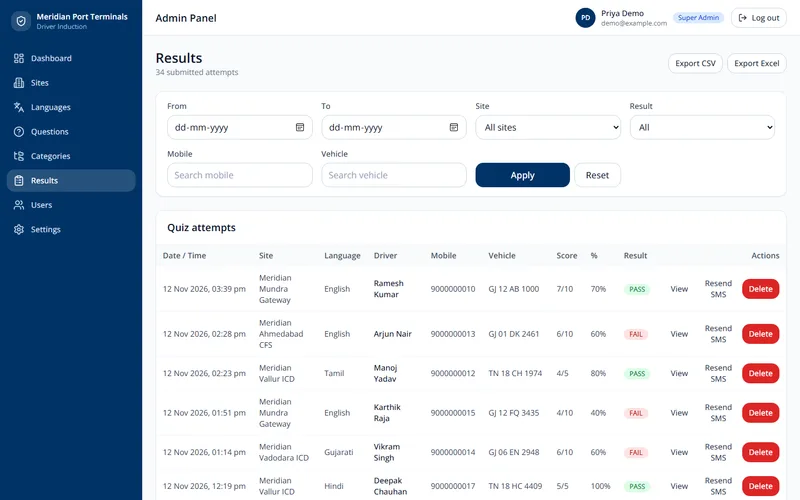
Enisop, our driver safety induction: each site has its own questions, languages, videos and pass marks, and a super admin sees every site.
Many client apps on one platform
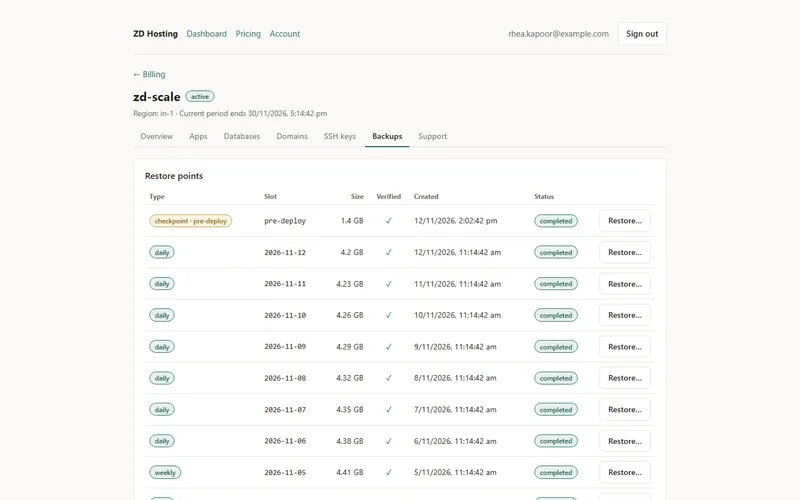
ZD Host, our hosting platform: 15 client apps, each in its own isolated space with its own backups.
Halls, rooms and teams
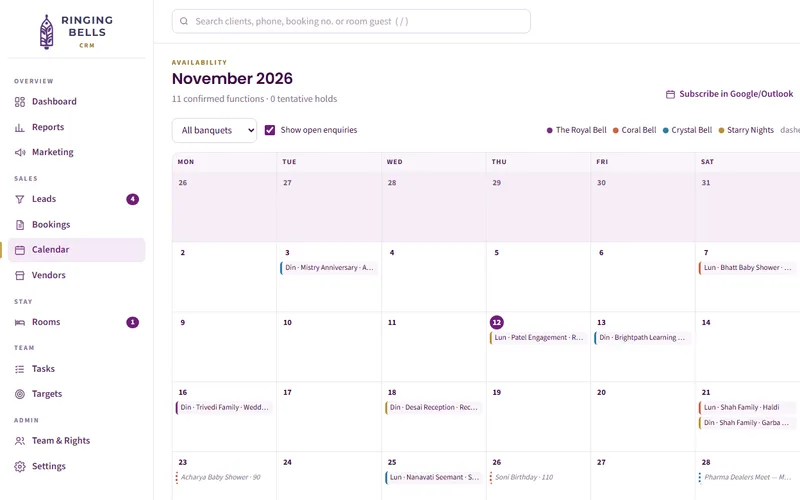
Ringing Bells Banquets: bookings, guest rooms, tasks and targets in one CRM, with team rights and an audit log.
Many roles
One system, every role.
Each person sees their part.
Departments and field staff
Trustiva Laboratory: departments, tests, staff and slots in the lab’s own system, with apps for patients and sample collectors.
Store, staff and AI on one database
WowEye: a storefront, an admin app and an AI server, each with its own database role; the AI’s is read-only.
Teams across the company
Our own Workforce Platform: attendance, tasks and payroll for our team.
04 · How it works
How our enterprise app development team works
Step 01
Brief
Tell us what you need, what you sell and where.
Step 02
Plan
We reply within two working days with one plan for your marketing and tech, priced in ₹.
Step 03
Roles, sites and data
We write down every role and site, what each can see and change, and the data the system keeps, before any code.
Step 04
Stages, launch and care
You test each stage with real roles, then go live one site or all at once. We host, back up and fix it.
05 · Selected work
Systems we run for many sites and roles
Live systems on our Work page, each used by many people in different roles. The pictures are copies with made-up data.
Build facts
Super admin and site admins
Enisop runs many sites from one admin panel, with results by site, CSV and Excel export, and results sent by SMS.
Team rights and an audit log
The Ringing Bells CRM runs bookings, rooms, GST invoices and reports, with rights for each team member and a log of changes.
Three database roles, no superuser
WowEye’s storefront, admin and AI server share one database, backed up to Cloudflare R2 with a written restore guide.
15 client apps, each kept apart
ZD Host runs each one in its own space, with an agent that only dials out over mTLS, and backups and restores with restic.
06 · Comparison
Why multi-site teams choose Zero Dimensions
Most organisations weigh ready-made tools for each team, a large IT firm, or an enterprise app development company like ours. Here is how they differ.
| What matters | Zero Dimensions | Ready-made tools per team | A large IT firm |
|---|---|---|---|
| Roles for each site | Set to your sites, in writing | Each tool has its own users | Yes, at a large firm’s pace |
| All sites in one place | One database for every site | Split across tools | Yes |
| Backups and restores | Nightly, with restore points | The vendor’s, out of your sight | Often a separate contract |
| Who you deal with | The people who build and host it | A support desk per tool | An account manager |
| Who owns the code and data | You do | Rented; you can export data | Agree it in writing |
A large IT firm makes sense for thousands of users across countries, or when procurement asks for certifications. For a growing organisation with several sites, a team that builds and hosts the system itself costs less to run and to change.
07 · Control
Who sees what, in writing.
What you can check before, during and after the build.
- Who can see and change what, for each role and site, agreed in writing before any code.
- A log of who changed what and when, on the records that matter to you.
- Database accounts by purpose: the app, reports and admin each get only what they need.
- Nightly backups with restore points, and a written way to restore.
- The code, the database and every login are yours.
- Start with one site or one module, and add the rest when it works.
08 · Cost
What sets enterprise app development cost
The price follows the size of the job, not the word “enterprise”. We don’t publish rates. Five things set it.
How many sites, roles and users the system serves.
Web only, or Android and iPhone apps as well.
The data moved in from spreadsheets or old software.
What it connects to: SMS, payments, lead ads, lab machines or accounts.
Hosting, backups and care after launch.
Tell us what you need and we send one plan, priced in ₹.
Get visible09 · Questions
Enterprise app development company FAQs
It builds the software an organisation runs on when many people use it in different roles, often across several sites: admin panels, web apps and phone apps, with the access rules, records of changes and backups that keep them safe. Enterprise app development is less about the size of the company and more about that control.
Our systems run businesses with several sites, departments and teams, not thousands of offices. We show live systems with roles, audit logs and backups, and we don’t claim clients or certifications we can’t show you. If your project needs a large IT firm, we will say so.
Yes. Enisop, our driver safety induction, runs many sites from one admin panel: each site has its own questions, languages, videos and pass marks and its own site admin, while a super admin sees every site.
We list your roles before the build: who sees which sites, which records and which actions. The rules sit on the server, not only on the screen, so hiding a button is never the only lock. When someone leaves, you turn off one login.
Where you need one, yes. The Ringing Bells CRM keeps an audit log beside its team rights, so the team can see who changed what and when. We agree in writing which records the log covers.
The systems we host run on ZD Host, our own platform, with nightly backups and restore points, made and restored with restic. A deploy that fails its health check rolls back. For WowEye we wrote down how to back up to Cloudflare R2 and how to restore.
You do. For systems we build for you, you own the code, the database and every login, whether or not we host it.
Yes. Whether you are looking for an enterprise Android app development company or for enterprise iPhone app development, we build one React Native app for both phones that signs in with the same roles as the web system. Trustiva Laboratory’s customer app and field app are built this way.
It depends on the sites, roles and users, the apps, the data moved in, the connections and the care after launch. We don’t publish rates. Tell us what you need and we send one plan, priced in ₹.
It depends on the roles, sites and data. A large system is built in phases: Trustiva Laboratory’s lab platform was written up as 145 requirements, 51 screens and a 32-entity data model, with a phase 1 scope and a phase 2 roadmap.
In Ahmedabad, on the 4th floor of i-Hub, inside KCG Campus, Navrangpura, Monday to Saturday, 9:30 am to 6 pm. We build for organisations across India.
Ask to see a live system with roles for each user, a log of changes and a restore point, not slides. Ask who hosts and fixes it, and who owns the code. Compare enterprise app development solutions on those answers, not on logos. Ours are on our Work page.
Ready to be seen?
Tell us what you need, what you sell and where. We reply within two working days with one plan for your marketing and tech, priced in ₹.
Prefer to talk? Call +91 63544 29800 or WhatsApp us.